




The Razr Fold is stuck in the middle

For a phone that gets a lot right, the Motorola Razr Fold is frustratingly hard to recommend.
The Razr Fold is the company’s first book-style foldable, and it enters the US market with something not currently available on the competition: truly excellent battery life that rivals the best slab-style phones. No need to worry if you spend a long session gaming or working in a Google doc on the inner screen. The Razr Fold is going to easily get you through your day and then some. Samsung and Google’s foldables are much more likely to generate battery anxiety on a day of heavy use.
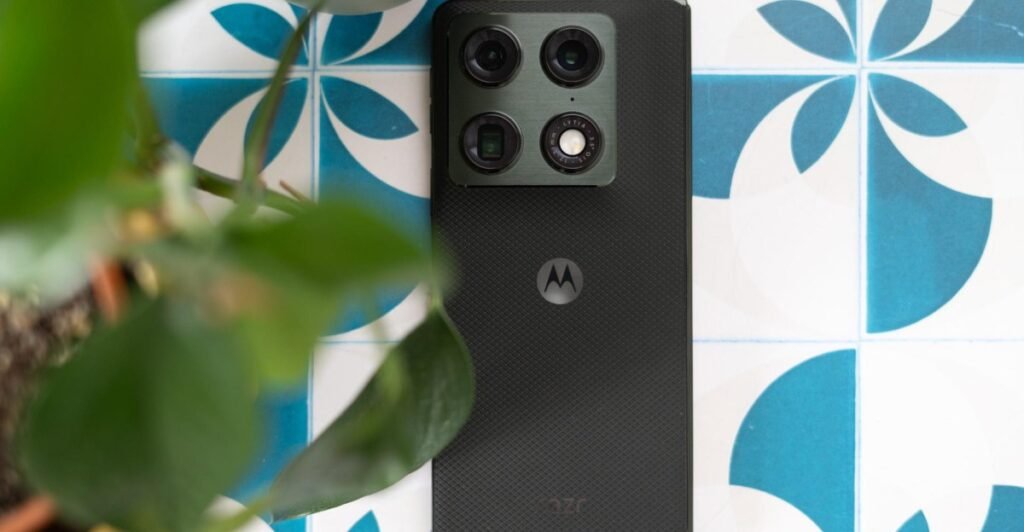
Also, the Razr Fold looks nice. The rounded corners, soft touch back panel, and well-considered color options are very welcome and very Motorola. Nobody is making better-looking phones than this company right now. As a reminder, it’s okay to care about how your phone looks.
But the Razr Fold sets a very high bar for itself by virtue of costing $1,900. And at that price, it falls short in a few ways. This is a phone that puts all of its polish front and center — a great design, a big battery, and a clever multitasking system — but then drops the act around the edges. And there are a few too many rough edges for this high-end of a device.


$1900
The Good
- Excellent battery life
- Thoughtful multi-tasking interface
- Attractive styling
The Bad
- It costs $1900
- Some photo processing inconsistencies
- No magnets
- Bloatware bloatware bloatware
The Razr Fold’s 6,000mAh battery really is its biggest asset. It’s able to offer so much capacity thanks to its silicon carbon technology, allowing it to store more energy than traditional lithium-ion batteries. Chinese phone makers are quickly adopting it while Apple, Samsung, and Google have been reluctant — likely because of some concerns about the battery tech degrading faster than straight-up lithium-ion. Motorola and its China-based parent company Lenovo seem not to share the same concerns, since this year’s entire Razr lineup uses silicon-carbon tech.
It’s hard to say how well justified the concerns are around longevity since silicon-carbon hasn’t been used in phones for that long. In my extremely unscientific opinion and limited short-term testing, I can say that silicon-carbon absolutely kicks ass in a phone. I never even came close to triggering low power mode on the Razr Fold. Even on a day with a healthy amount of camera use and an hour using the inner screen, the battery was still above 50 percent by bedtime.
I never even came close to triggering low power mode on the Razr Fold
Motorola has also figured out a multitasking solution on the inner screen that rivals could learn from. It feels like a good compromise between Samsung’s “anything goes” approach and Google’s three app maximum. You can open two apps in split screen or have one app occupy most of the screen with a second in the background just a quick tap away.
On top of that, you can embrace chaos and open multiple apps in small “freeform” windows you can resize and move around the screen. I got up to four apps running in this mode on top of two apps operating in split screen before I decided it was too much stimulation. But I like this meet-in-the-middle approach that allows me to invite as much or as little chaos as I want.

Battery and multitasking are pretty important things to get right on a folding phone. And yet, the Razr Fold disappoints in other ways. For starters, there are entirely too many preloaded apps on a device of this stature. Many, but not all of them, can be uninstalled. But just on principle, I don’t think anyone should have to spend time clearing out bloatware on a phone that costs this much.
The Fold is also missing some small but life-improving hardware upgrades. There are no Qi2 magnets built into the back of the phone, and I increasingly believe every phone should have magnets. The Fold supports wireless charging, but you won’t be able to thwack it onto a MagSafe-style charger like you can with the Pixel 10 Pro Fold.
And while I appreciate Motorola making a stylus for the Razr Fold, there’s no way to attach it to the phone and no case for the Fold with a place to store it. I forgot to bring it with me on more than one trip to a coffee shop where I intended to use it. The stylus is sold separately for $99 anyway, so maybe it’s a fair assumption that if you’re going out of the way to get one, you’re committed enough to figuring out the carry situation on your own.

Aside from being the silicon-carbon battery, the Razr Fold doesn’t break any new ground hardware-wise. It’s less heavy and bulky than the Pixel 10 Pro Fold, but lacks that phone’s full dust resistance. And although the Razr Fold is leaner than the Pixel, it still constantly reminds me that I’m carrying it when it’s in my bag or pocket. The Z Fold 7, which costs $100 more than the Razr Fold, is appreciably smaller and lighter. That’s its whole deal. The Fold is kind of in no-man’s land between the incumbents, and that’s an uncomfortable place to be if you’re going to charge a premium.
Recent Motorola phones have been pretty weak in the camera department; forgivable on a $400 phone but not one that costs $1,900. There’s some good news: Image processing looks better on the Razr Fold than it has on past Motorola phones. I see less tendency toward overly bright, washed out images. Photos in bright daylight show pleasant contrast and saturated blues. The 50-megapixel ultrawide is a cut above the usual 12-megapixel chip, producing plenty of sharp detail.
Consistency is the thing, though, and the Razr Fold’s camera system occasionally missteps. I noticed a jarring change in color cast a couple of times when switching between the wide and telephoto. The tendency to boost shadows too aggressively also shows up here and there, particularly when I’m using the 2x crop zoom, or photographing a gray, overcast scene outdoors.
I’m also not a fan of the generative AI-augmented digital zoom that kicks in above 20x. It introduces some artifacts when trying to clean up text — classic AI. There’s also an uncanniness to the way it processes small details in a scene, like distant features in the side of a building. They look too clean, and features are sort of smoothed out and blended in a way that just looks unnatural. Thankfully, there’s some text that pops up on the screen when it kicks in, and you can turn the feature totally off in settings.

If Motorola had launched the Razr Fold four years ago, I might feel differently about it. The Galaxy Z Fold was still growing out of its awkward too-tall shape, and the Pixel Fold didn’t exist at all yet. A folding phone with sophisticated styling? With a battery that lasts all day? That might have been worth $1,900 back then, considering there was nothing like that at the time.
But it’s 2026, which is an unfortunate time to be launching a pricey phone. The memory crisis surely played a part in the Razr Fold’s high price. Samsung and Google will likely launch successors to their folding phones later this summer, and I won’t be surprised if their prices go up. But here and now, the Razr Fold feels like a bit too little, for too much, too late.
Photography by Allison Johnson / The Verge
Agree to continue: Motorola Razr Fold
Every smart device now requires you to agree to a series of terms and conditions before you can use it — contracts that no one actually reads. It’s impossible for us to read and analyze every single one of these agreements. But we started counting exactly how many times you have to hit “agree” to use devices when we review them since these are agreements most people don’t read and definitely can’t negotiate.
To actually use the Motorola Razr Fold, you must accept the following:
- Motorola’s Privacy and Software Updates
But you also get to decide how Motorola’s support works on your phone:
- Help improve Motorola products (optional)
- Enhanced device support (optional)
- Smart updates (optional)
After entering your Google account, you are asked to:
- Add a phone number to your Google account (optional)
And you must agree to the following from Google:
You’ll also need to agree to the following on Google Services:
- Install updates and apps: “You agree this device may also automatically download and install updates and apps from Google, your carrier, and your device’s manufacturer, possibly using cellular data. Some of these apps may offer in-app purchases.”
- Use basic device backup (optional)
- Use location (optional)
- Allow scanning (optional)
- Send usage and diagnostic data (optional)
- You can set up Google Assistant (optional)
- Activate Voice Match for Hey Google (optional)
- Access Assistant without unlocking your device (optional)
- Motorola AI Terms and Conditions (optional)
Lastly, you have the option to join Motorola’s user community:
- Give permission to Motorola to send push notifications about its services and benefits (optional)
- Provide your email to Motorola (optional)
In total, you have to accept five main agreements and can bypass 14 when setting up the Motorola Razr Fold.
You may be interested

Foo Fighters Play ‘This Is a Call’ and ‘Everlong’ on Colbert
new admin - May 14, 2026[ad_1] Foo Fighters returned to the Late Show on Wednesday night, playing a high-energy medley of the very first and…

AMD’s FSR 4.1 upscaling tech is coming to older graphics cards
new admin - May 14, 2026AMD is bringing its FSR 4.1 upscaling tech to older graphics cards. In an announcement on X, Jack Huynh, AMD’s…

49ers’ George Kittle shares funny spider story during Achilles rehab
new admin - May 14, 2026[ad_1] NEWYou can now listen to Fox News articles! San Francisco 49ers star tight end George Kittle is no stranger…