





First look: Apple’s HomeKit Secure Video gets much-needed updates

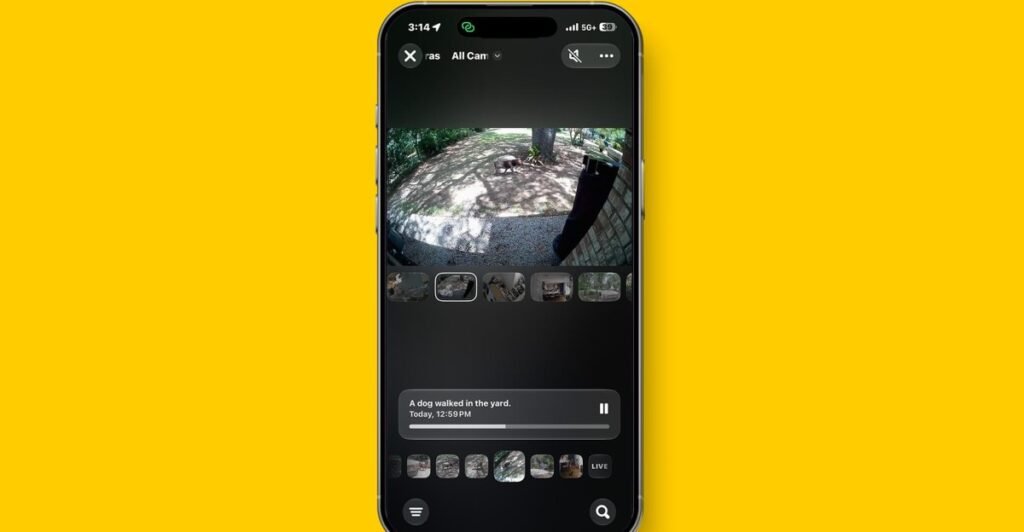
Apple’s HomeKit Secure Video service is getting in on the Apple Intelligence party to bring more descriptive alerts from your connected cameras and let you search footage using natural language. The Apple Home app is also getting better notifications powered by AI and is finally adding support for energy reporting.
These improvements were announced at WWDC last week and will be publicly available this fall. I’ve been playing with some of the features in the developer betas for iOS 27 and tvOS 27 for a few days, and based on my first impressions, Apple’s HomeKit Secure Video is much improved — enough to put it back in contention for me as a home security system.
I test a lot of home security cameras and have largely stopped using Apple’s HomeKit Secure Video because it was sometimes unreliable (with cameras disconnecting and clips going missing) and sent too many notifications.
While I love that it processes video locally and is end-to-end encrypted, the service has been leapfrogged by competitors like Ring and Google Nest with their higher-resolution cameras and smarter AI-powered alerts. These include text descriptions of recordings, giving you glanceable info of what’s happening at your home, so you don’t have to wait to pull up a video to view it yourself — helping cut down on notification fatigue. It’s a genuinely useful application of AI in the smart home.
With Apple Intelligence bringing these features to Apple Home, Apple’s smart home platform is gaining parity with competitors’ offerings. It will also soon support up to 4K video resolution, and when you factor in that the service works with cameras from several manufacturers, it gets more compelling — as long as you’re an iPhone user.
1/4
Apple Intelligence-powered text descriptions
To activate the new Apple Intelligence features, I needed to download the iOS 27 developer beta to my iPhone 17 Pro Max and the tvOS 27 beta to my Apple TV 4K, which acts as my Home hub. I then had a new Apple Intelligence section in Home settings. Here, I toggled on new options for “summarize videos” and “reduce notifications” and selected which cameras receive summaries.
Summarized videos use AI to process video from my HomeKit Secure Video cameras and send a notification with a more detailed description of the action. So, instead of an alert saying “animal detected,” I’ve been getting “dog in yard,” and instead of “person detected,” I’ve seen “lawn mowing.” I also had one notification that summarized several activities from one camera: “Someone walked into the yard and then went back out to a dog. Aqara G5 changed modes.”
1/4
In the app, each clip now also displays this short AI-generated description, such as “Someone held a cat in the kitchen” or “Chickens grazing in the yard.” Occasionally, it identifies the person (I have Face Recognition on), but not always.
The descriptions are very brief, especially compared to those I get from Ring’s and Google’s AI features, but they do provide helpful extra context. I am also still getting standard alerts, such as animal or person detected, so my notification load hasn’t reduced. However, this is the first developer beta, so I expect to see more refinements before this launches.
I’ve used a lot of camera app interfaces, and this is one of the simplest and most intuitive
Searching my camera feeds with natural language worked well — I typed in “Show me my cat” and got a lot of cat videos. But it couldn’t distinguish between my grey cat and my black cat. If I were using a HomeKit video doorbell, this would be useful to search for things like when my son got home or what time the UPS delivery person came by.
I haven’t seen any reduced notifications for other Home accessories yet. According to Apple, this will use Apple Intelligence to determine that several activities from connected devices, such as someone arriving home and a door being unlocked, are related to the same event and send one notification that it will keep updating.
Of course, I ran into several bugs, and the app crashed fairly regularly, but again — first developer beta. Overall, this feels like a really good start, and Apple Intelligence has already improved the usefulness of my HomeKit-connected cameras.
1/4
An improved interface and faster response times
One HomeKit Secure Video improvement I noticed right away is that viewing recorded clips and live streams loads faster. I can also view more than two live streams when away from home, which is a welcome upgrade and, again, something competitors have had for a while.
I’m a big fan of the new camera view in the Home app, where I can scroll through a timeline of clips or view a live feed from all the cameras at once. The clips are sequenced by time, not by camera, so scrolling shows activity around the home in real time. When I click on a clip, a camera switcher presents footage from other cameras recorded at the same time on either side — which is really handy. I’ve used a lot of camera app interfaces, and this is one of the simplest and most intuitive.
Apple also said that Apple Intelligence will be able to understand connected activities across cameras and present footage from different cameras in a single clip in the app, but I haven’t seen this yet in my testing.
The clips are sequenced by time, not by camera, so scrolling shows activity around the home in real time
Other improvements include an overhaul of the infrastructure for HomeKit Secure Video, including how clips are captured, stored, and processed. As mentioned, I’ve noticed the cameras load faster, and they are also more stable. An Eve outdoor camera that regularly dropped offline has stayed online since the upgrade. Whether these improvements have addressed the missing clip issue will take more testing.
Apple also announced support for 2K and 4K HomeKit Secure Video streams, but that feature isn’t available in the current beta. It seems it will rely on manufacturers of compatible cameras — including Aqara, Eve, and Eufy — to implement the new HomeKit Secure Video spec announced at WWDC, meaning it may be a while until we see it in our homes.
1/4
Energy monitoring finally arrives
Another long-awaited upgrade is that the Home app now supports energy monitoring through Matter. There’s a new power icon in the Energy tab, along with tiles for each connected energy monitoring device. I have a Matter-over-Thread Ikea Grillplats plug that now shows its current, average, and daily usage in kWh. Clicking on the card took me to more detailed reporting, where I could see its usage over a year, six months, a month, a week, and a day.
However, there’s no option to use energy reporting to trigger automations, and you still can’t use different events captured by the cameras to trigger automations, such as “turn on the porch light if a package is detected.” This is something you can do in Google Home, and that platform just added the ability to create automations based on custom actions.
Smarter cameras and energy reporting are great additions to Apple Home, and so far the upgrades to HomeKit Secure Video have impressed me; I’m looking forward to seeing how they shape up in the full release later this year. But Apple is still playing catch-up when it comes to features like automations and intelligence. These are what take a smart home platform from a command-and-control system to something that can proactively manage itself.
Screenshots by Jennifer Pattison Tuohy / The Verge
You may be interested

Colin Gray, father of Apalachee High School shooter, sentenced to 15 years in prison
new admin - Jul 31, 2026A judge sentenced Colin Gray to 15 years in prison Thursday, following emotional testimony from victims' families during his sentencing hearing in…

7/30: CBS Evening News – CBS News
new admin - Jul 31, 20267/30: CBS Evening News - CBS News Watch CBS News Mass migration triggers a military response in the Spanish city…

Lorde Brings Out Charli XCX for her Headlining Set at Lollapalooza
new admin - Jul 31, 2026[ad_1] “You look hot from up here,” Lorde quipped as she surveyed the sea of people who packed her headlining…